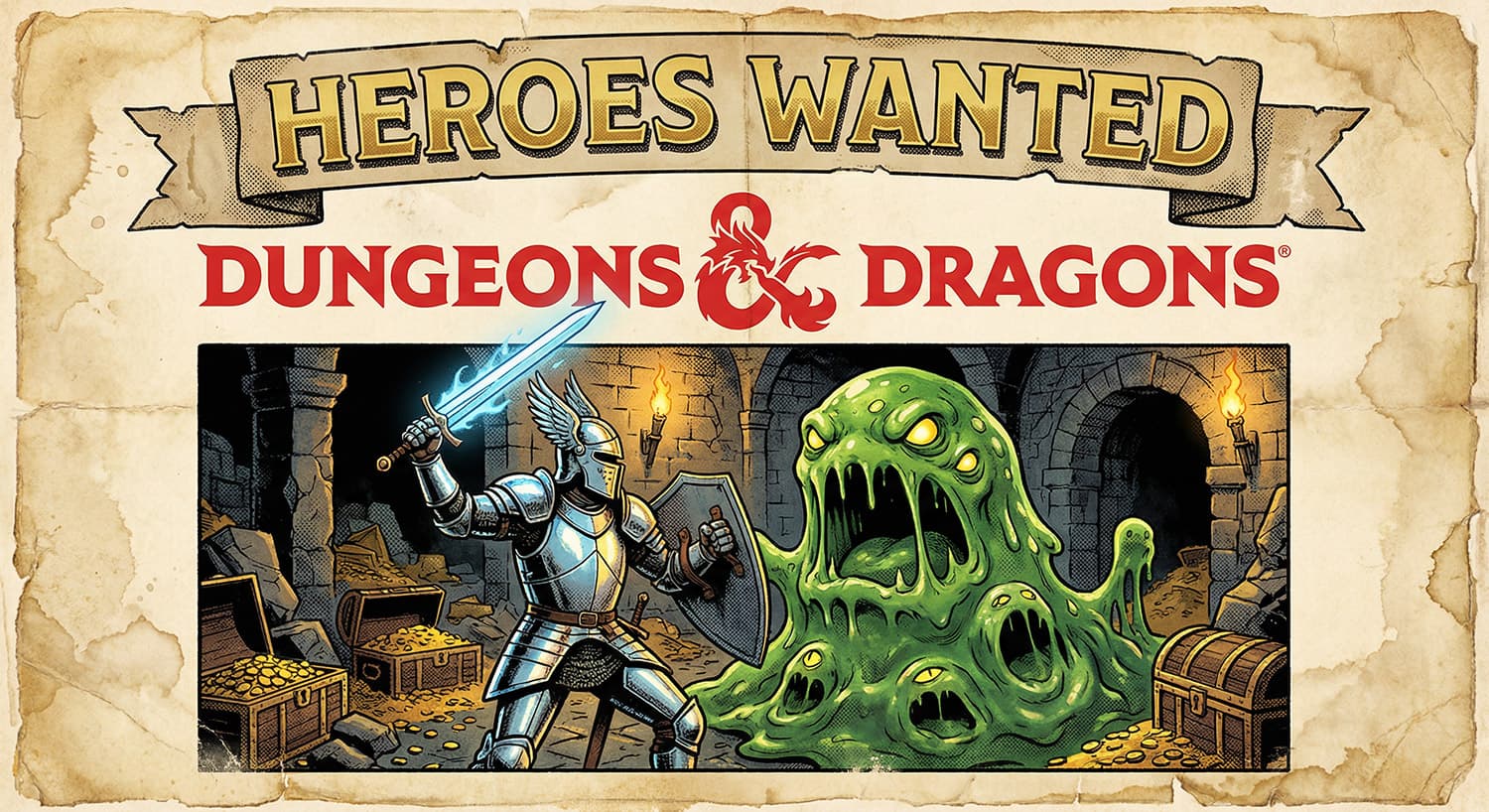
Tabletop roleplaying games from the 1970s and 1980s have a distinct visual style. The covers of old rulebooks and magazine advertisements featured highly detailed ink illustrations, heavy shadows, and muted colors printed on cheap paper. Recreating this specific look using modern AI generators requires careful instruction. Left to their own devices, most AI tools will render fantasy scenes with a glossy, digital finish.
To get that authentic retro print aesthetic, you need to tell the AI exactly how the physical paper should look. This involves asking for distressed edges, halftone printing dots, and faded ink. By combining these physical print characteristics with classic fantasy subjects like knights and monsters, you get a perfect homage to old-school gaming.
Here is the exact text you need to copy and paste into your favorite image generator. I have filled in the variables with a classic knight fighting a green slime monster, but you can easily swap those out for a dragon, a wizard, or any encounter you want to see.
Variations Section
Here are 5 alternative scene descriptions you can plug into the [INSERT SCENE DESCRIPTION] and [INSERT BACKGROUND DETAILS] sections of the main prompt to achieve the different styles shown in your reference images:
Variation 1: The Epic Dragon Encounter (Retro Anime/Manga Fantasy)
- Headline: YOUR EPIC SAGA
- Scene: a young, determined anime-style warrior boy with spiky brown hair and a red cape, alongside a fierce blonde elf female archer drawing her bow, both fighting a colossal, roaring blue dragon breathing jagged blue lightning.
- Background: a sprawling fantasy landscape with jagged mountains, green plains, and dynamic action lines.
Variation 2: The Stained Glass Holy War (Stained Glass Aesthetic)
- Headline: FIGHT FOR THE LIGHT
- Scene: a holy cleric in white robes with a golden halo holding a glowing spiked mace aloft, confronting a massive, muscular red demon with horns and bat wings wielding a flaming sword.
- Background: constructed entirely of intricate stained glass panes showing a radiant yellow sun and swirling blue clouds, thick black lead lines separating the vibrant glass colors.
Variation 3: The Synthwave Dragon (80s Neon Cyber-Fantasy)
- Headline: THE FUTURE OF FANTASY
- Scene: a futuristic knight in dark armor wielding a glowing neon-pink lightsaber-style sword, facing off against a massive cybernetic dragon made of glowing blue and purple wireframe polygons breathing blue electric fire.
- Background: an 80s synthwave outrun aesthetic with a glowing pink and orange sunset, a neon-purple laser grid floor stretching into the horizon, and a starry night sky.
Variation 4: The Gothic Dungeon Crawler (Black & White Pen/Ink Sketch)
- Headline: DEATH AWAITS THE FOOLISH
- Scene: a party of classic adventurers including a dwarf warrior, a robed wizard holding a torch, and a rogue with a drawn sword, cautiously entering a dungeon room while a terrifying gargoyle demon emerges from the shadows above.
- Background: a masterfully detailed black and white crosshatched pen and ink illustration of a classic dungeon crawl, featuring stone brick walls, a spiked pit trap, a skull, and heavy, moody crosshatched shading.
Variation 5: The Magical Forest Guardian (Art Nouveau/Golden Age Illustration)
- Headline: MAGIC IS REAL
- Scene: a graceful blonde elven enchantress in flowing green and gold robes holding a glowing wooden staff, standing before a towering, angry treant (tree-monster) with glowing orange eyes and a fiery maw.
- Background: a lush, stylized Art Nouveau magical forest filled with delicate, intricate wildflowers, daisies, and curling vines bordering the edges of the poster, rich earthy greens and golds.
Customization Tips
- Text Generation: If you are using a generator that struggles with text (like older versions of Stable Diffusion), remove the text prompts (
"[INSERT HEADLINE HERE]"and the logo description) and focus purely on the art style and scene. DALL-E 3, Midjourney v6, and Ideogram are currently the best for handling text accurately. - The “Halftone” Effect: To make it look genuinely vintage, the keywords
halftone printing dots,distressed edges, andfaded ink texturesare crucial. You can increase the intensity by addingcomic book print misregistrationorcheap 1980s pulp paper texture. - Color Palettes: Adjust the mood by specifying colors. For example, add
muted earth tones,neon synthwave colors,monochrome crosshatching, orvibrant stained glass colors.
Recommended Settings
- Aspect Ratio: These posters are strictly vertical. Use
--ar 2:3or--ar 3:4in Midjourney, or select a vertical/portrait dimension (e.g., 832×1216) in other tools. - Style Stylization (Midjourney): Use
--stylize 250or higher to ensure the generator leans heavily into the artistic, illustrative style rather than trying to make it look like a photograph. - Midjourney Version: If using Midjourney,
--v 6.0is highly recommended for accurate text generation and following complex layout structures.